


From web portal to MOBILE command center: TrucKonnect Fleet management APP
BharatBenz's Truckonnect portal was built for fleet managers sitting at desks, monitoring truck health and driver behavior across a large vehicle inventory. As operations teams in India increasingly work on mobile, a native iOS/Android adaptation was required as a rethought experience for users who check dashboards between loading dock visits and phone calls.
My Role
UI/UX Designer
Timeline
4 Months
Platform
iOS & Android
Constraints & Considerations
-
🪪 MULTI-ROLE ACCESS : The same app serves fleet owners (strategic view), operations managers (trip-level), and drivers (their own vehicle only). One codebase, three mental models.
-
🖥️ EXISTING WEB LOGIC : All data models, APIs, and filter logic were inherited from the web portal, constraining what could be redesigned vs adapted.
-
📎 ENTERPRISE BRAND: BharatBenz's dark red identity had to be preserved. The system design borrows from automotive instrument-panel aesthetics.
-
📊 SCREEN REAL ESTATE : Web portals use massive tables and complex multi-axis charts. Mobile requires aggressive summarization. We had to move from "show everything" to "Progressive Disclosure".
Why did the need to design a mobile app arise?
Context & business case
COST SAVING
Fleet operators who monitor in real-time reduce fuel theft and unplanned downtime through push notifications- mobile access directly ties to cost savings per vehicle per month.
Market context
India's logistics workforce is mobile-first. Managers, supervisors, and dispatchers increasingly rely on smartphones as their primary work device.
Compliance & safety
Real-time alerts for AdBlue faults, DPF warnings, and harsh driving require immediate awareness - not something you catch hours later on desktop.
User retention
Keeping fleet managers engaged between desk sessions means the platform stays their single source of truth, reducing reliance on driver phone calls.
Fleet owner /
manager
Runs 10-50 trucks. Needs the big picture. Key tasks: check daily utilization, identify idle vehicles, review fuel exceptions, track driving scores. Cares most about aggregate metrics and exception alerts. Uses dashboard carousel and Fleet Insights.
Logistics / operations supervisor
Works at a depot or loading point. Needs to know where a specific truck is, whether it's on time, and whether there are any active faults. Key tasks: Track & Trace, route playback, geofence alerts, vehicle summary. Time-critical - often checking between tasks.
User personas & use cases
Who uses the app and why
User journey: a morning shift
"It's 7am. I need to know which trucks are running, which are stuck, and if anything broke overnight - before I get on my first call."
1
Opens app → Dashboard carousel
Truck Utilization shows 12 running, 7 idle, 4 stopped at a glance. Swipes to Driving Score & Summary to check the overnight fleet score and alert count.
Screens: Truck Utilization · Driving Score & Summary
2
Taps Track & Trace → vehicle list
Scans the list and spots one truck with a noticeably higher alert/incident count than the rest. Switches to map view to see where it's currently stopped
Screens: Vehicle list (with alert counts) · Map view
3
Opens vehicle detail → Route Playback
Plays back the truck's last trip and sees an incident marker on the route - an Overspeed Alert just before it stopped. Expands the Incidents list to read the details.
Reports → Autotrip Summary, Download/export
4
Shares live location from Details tab
Creates a live location share for the flagged truck and sends the link to the nearest depot team so they can locate it and check in with the driver.
Screens: Details tab · Share Live Location flow
5
Pulls Vehicle Summary report
Opens the flagged vehicle's report, notes the Potential Savings and Idling % figures, exports it, and shares with the operations head - all before 7:30am, from his phone.
Screens: Vehicle Summary — landing & details
Final Designs
The High-Fidelity Solution
1. DASHBOARD
usecases
-
Fleet owner opens app at 7am - Fleet Status card tells him 4 trucks are stopped before he makes a single call.
-
Operations manager checks Driving Score after a long-haul run to flag which driver needs coaching.
-
Manager spots 99 alerts in Driving Summary, swipes to the Driving Incidents panel to see Harsh Driving at 67% is the dominant contributor.

2. Track & Trace
usecases
-
Supervisor sees a red cluster on the map near an unexpected highway stretch - taps in to investigate a stalled truck before the driver calls.
-
Field coordinator searches a plate number to confirm a truck has left the depot, then shares its live location with the receiving warehouse.

3. GEOFENCE
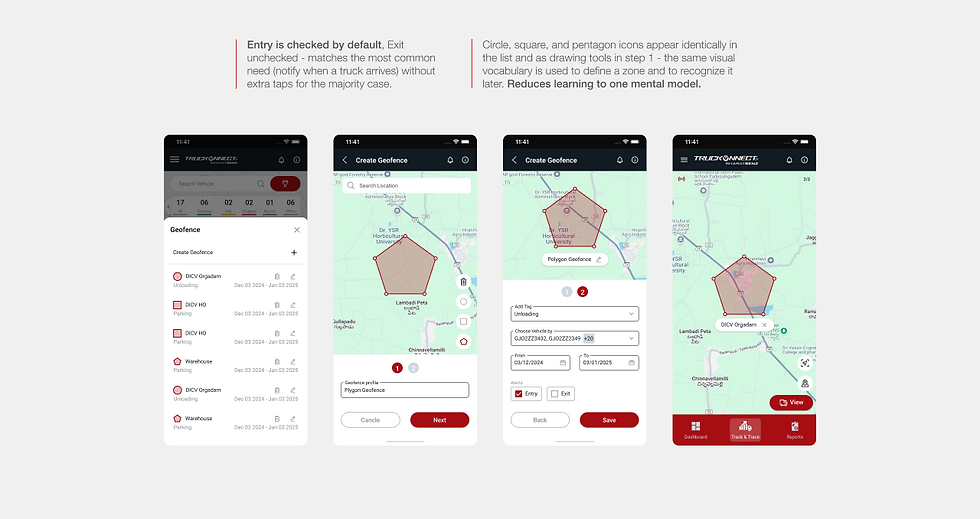
usecases
-
Field coordinator searches for a new customer site, draws a pentagon zone around it, tags it "Unloading", assigns 21 vehicles, and saves - all from the depot before the trucks depart.
-
Fleet owner gets a push notification when a truck enters the "DICV Orgadam" unloading zone — confirms delivery happened without calling the driver.
4. Live location
usecases
-
Field coordinator creates a 1-hour live location share for 21 vehicles heading to "Warehouse", adds the receiving dock manager's phone number, and sends the copied link over WhatsApp.

5. REPORTS
usecases
-
Operations supervisor pulls Vehicle Summary for a date range, downloads it, and sends it to the fleet owner as a morning report - all before reaching the depot.
-
Fleet owner opens Vehicle Instant during a vendor meeting to show real-time fuel levels across the fleet without opening a laptop.

What designing an information heavy - business oriented app taught me
LEARNINGS AND OPEN QUESTIONS
What mobile does better than web
Push notifications for faults and geofence events, live location sharing from within the app, and route playback with spatial incident overlays are all meaningfully better on mobile. These aren't ports - they're genuine improvements on the web experience.
Shareable links reduce dependency on the app itself
Live location sharing via URL means recipients — customers, warehouse managers — don't need TruckKonnect installed. This extends the product's value beyond its own user base, which matters for adoption.
Offline is the missing piece
No screen in this set handles the offline state. For a logistics app used on Indian highways, a "last synced X mins ago" indicator and cached last-known data are essential, not optional.
Prioritize Context Over Feature Parity
Instead of cramming every web feature onto a small screen, intentionally reserve the mobile app for real-time, quick-decision tasks (like live tracking and alerts), and leave complex configurations, bulk actions, and deep analysis to the desktop portal to create a focused, clutter-free experience.
Two-level reports
Export options for the vehicle lists as well as for a single vehicle. This gives users the flexibility to download based on context and requirements without the unwanted clutter.
Fuel & Mileage Trends
This should be considered for a future iteration: it's a natural extension of the Dashboard's Driving Summary (which already shows Mileage and Fuel Consumed as single numbers) into a trend-over-time view.
